Quietly on your desktop.
Time stays behind your windows, without taking focus from your work.
DESKTOP MODE Download for Mac↗
A GLASS FLIP CLOCK. MADE FOR MAC.
A transparent flip clock for a calmer desktop.
Quietly behind your windows. Or floating right where you need it.
macOS 12.4 or later · Free with optional PRO
THIS IS GLASSFLIPCLOCK.
A simple place to make time your own.
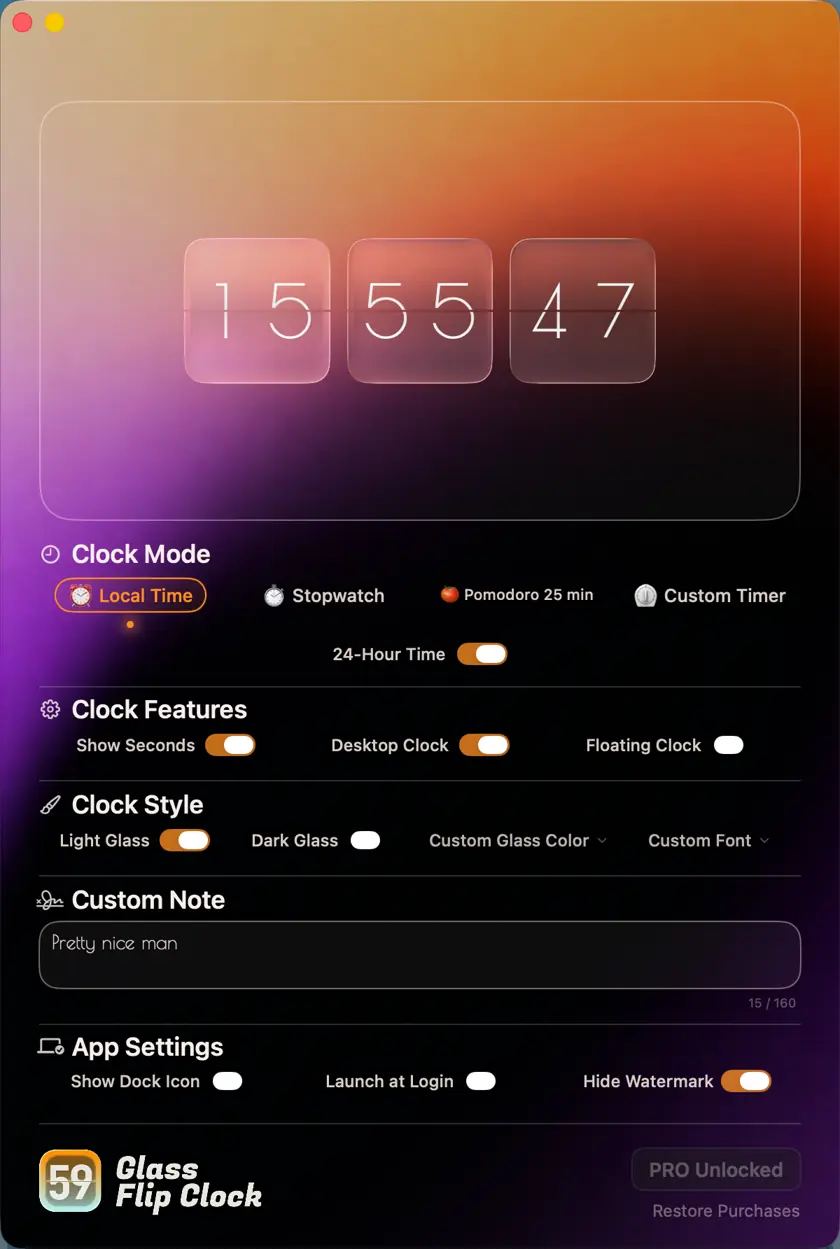
Switch between desktop and floating clock. Show seconds, or keep things minimal.
Choose light or dark glass. With PRO, customize your glass colors and clock’s artistic typeface.
A note, a goal, a thought for the day. Keep it close.
A LITTLE PRESENCE. A LOT OF POSSIBILITY.
Time stays behind your windows, without taking focus from your work.
DESKTOP MODEBring the clock forward. Move it, resize it, and keep it above your windows.
FLOATING MODELocal time, stopwatch, Pomodoro, and a custom countdown.
FOUR MODES · COUNTDOWN IN PROLight or dark glass. PRO adds custom colors and artistic fonts.
YOUR GLASS, YOUR STYLEA small note alongside the clock, for a reminder or a little motivation.
DESKTOP NOTESA fullscreen rainbow animation marks the end of a Pomodoro or countdown.
FULLSCREEN ALERTS
A CLEARER DESKTOP STARTS HERE.
Free to download. PRO is a one-time in-app purchase.
Available on the Mac App Store.